The Switch Statement in C++ Switch Statement is also called as multiple-branch selection statement. The switch statement, successively tests the value of an expression against a list of integer or character constants. When a match is found, the statements associated with that constant are executed. Syntax of Switch statement :
switch(expression)
    {
    case constant 1 : statement sequence 1;
                      break;
    case constant 2 : statement sequence 2;
                      break;
    case constant 3 : statement sequence 3;
                      break;
         :               :
         :               :
    [default : statement n] ;
    }
The expression in the switch statement evaluates its value and then matches with the values of cases one by one.
If a match is found, then it will execute the statement sequence associate with that case until the break statement is encountered.
If the break statement is encountered, then the program execution will reach to the end of the switch. But if no break is defined in case, then it will continue its execution and execute all the cases(even the default statement also) following a matched case without checking the value of case until the end of switch statement is reached.
The default statement is optional and it will execute if no match is found. If it is missing, then no action will takes place after all match fails.
Example of C++ program for switch statement (in presence of break) –
#include<iostream.h>
int main()
   {
   int x=0, ua=0, ub=0, uc=0, fail=0;
   while(x<=5)
       {
       switch(x++)
           {
           case 1: break;
           case 2: ++ua;
                   break;
           case 3: break;
           case 4: ++ub;
                   break;
           case 5: ++uc;
                   break;
           default : ++fail;
           }
        }
   cout<<"ua = "<<ua<<"\t ub = "<<ub <<endl;
   cout<<"uc = "<<uc<<"\t fail = "<<fail ;
   return 0;
   }
Output :
ua = 1      ub = 1
uc = 1      fail = 1
Example of C++ program for switch statement (in absence of break) –
#include<iostream.h>
int main()
   {
   int x=0, ua=0, ub=0, uc=0, fail=0;
   while(x<=5)
       {
       switch(x++)
           {
           case 1:
           case 2: ++ua;
           case 3:
           case 4: ++ub;
           case 5: ++uc;
           default : ++fail;
           }
        }
   cout<<"ua = "<<ua<<"\t ub = "<<ub <<endl;
   cout<<"uc = "<<uc<<"\t fail = "<<fail ;
   return 0;
   }
Output :
ua = 2      ub = 4
uc = 5      fail = 6
The Nested Switch :
The switch statements can also be nested. i.e. a switch inside a switch means that a switch statement will exist as part of the statement sequence of another switch. Syntax of Nested Switch statement :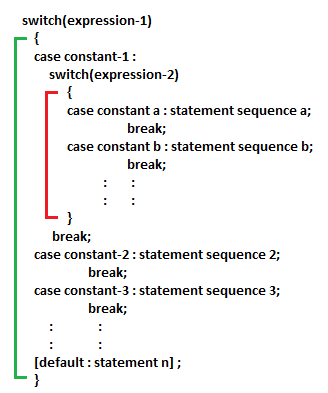
Example of C++ Program for nested Switch (Print the largest of three numbers using switch/nested switch) –
#include<iostream.h>
int main()
   {
   int x,y,z;
   cout<<"Enter the value of x, y and z = \n";
   cin>>x>>y>>z;
   switch(x>y && x>z)
        {
         case 1:                               // 1 means TRUE
               cout<<x<<" is greater.";
               break;
         case 0:                               // 0 means False
               switch(y>=x && y>=z)
                    {
                     case 1:
                             cout<<y<<" is greater.";
                             break;
                     case 0:
                             cout<<z<<" is greater.";
                             break;
                    }
          }
   }
Output :
Enter the value of x, y and z =
20
70
40
70 is greater.
]]>