Conversion of ER Diagram to Relational Model – Minimisation of ER Diagram – (7-STEPS) To convert the ERD to Relational Model, There are 7 Steps to be followed, which are
- Conversion of Strong Entities –
- Conversion of Weak Entities
- Conversion of one to one Relationships
- Conversion of One to Many Relationships
- Conversion of Many to Many Relationships
- Conversion of n-ary Relationships
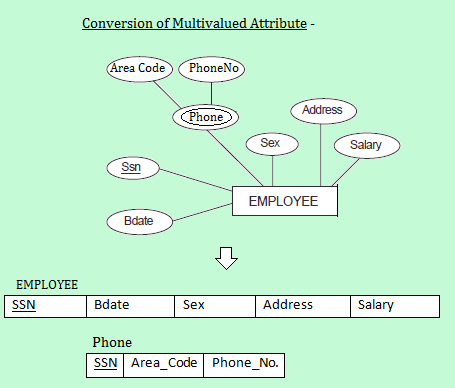
- Conversion of Multivalued Attribute
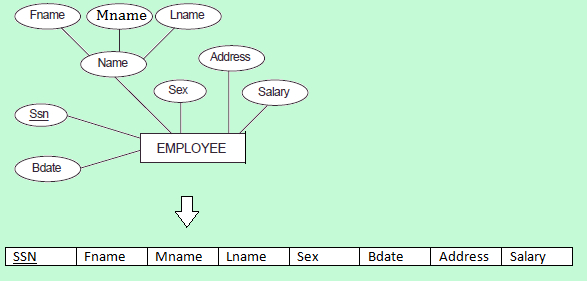
1. Conversion of Strong Entities –
- For each strong entity in ERD, create a separate table with the same name.
- Create all simple Attributes
- Break the Composite attributes into simple attributes and create them.
- Choose a Primary Key for the table.
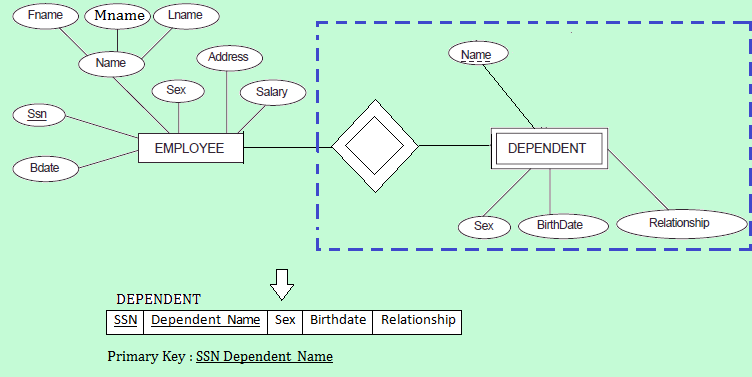
2. Conversion of Weak Entities –
- For each weak entity, create a separate table with the same name.
- Include Primary Key of the strong entity as a foreign key in the table.
- Select the Primary Key attributes of strong entity and the partial Key attribute of the weak entity, and declare them as primary key
3. Conversion of One to One Relationships –
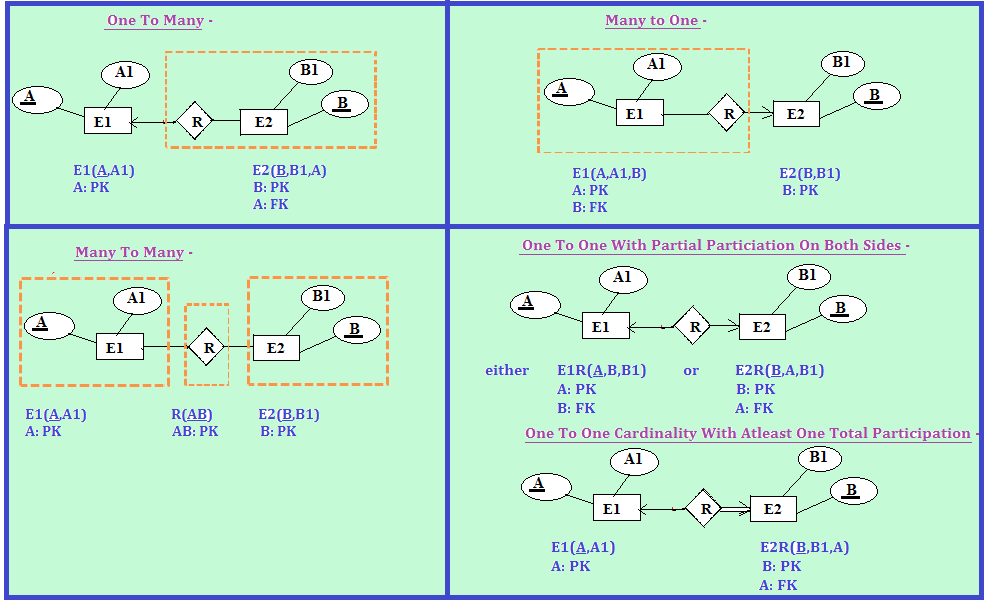
There are two possible approaches on the basis of Participation Constraints –- Partial Participation on Both Sides – For each One to One Cardinality between E1 and E2 with partial participation on both sides, modify either E1 or E2 to include the primary key of other table as a foreign key.
So, 1:1 cardinality with partial participation on both sides can be minimised into two relations only.
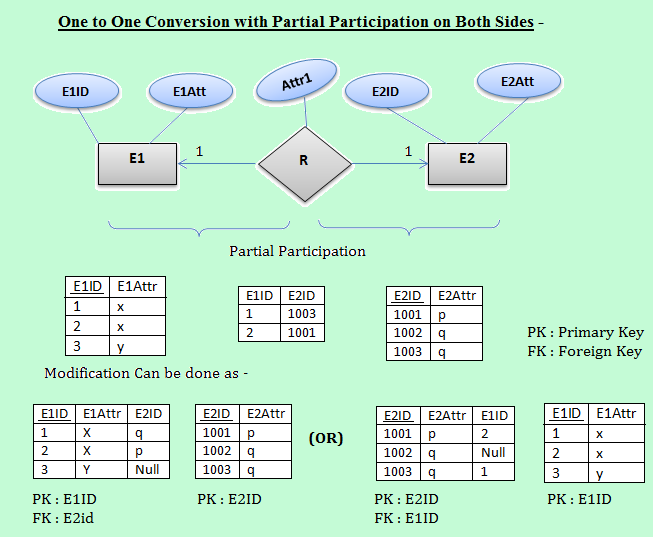 If we try to minimize the above ERD in a single table, i.e. E1RE2, then it contains too many NULL values, and therefore, we are not be able to select a primary key. For example,
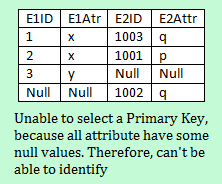
- Cardinality with atleast one Total Participation – For each One to One Cardinality between E1 and E2 with atleast one total participation, modification is done only on total participation side.
So, One to One Cardinality with atleast one Total Participation can be minimized into a single relation.
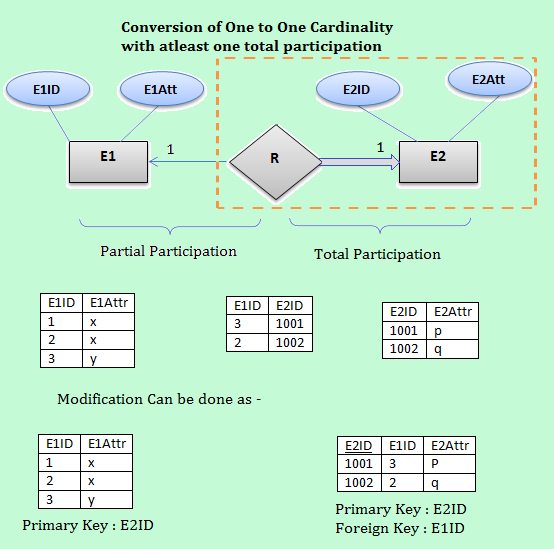
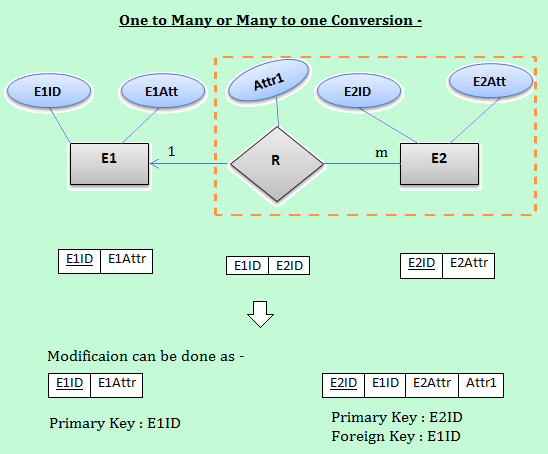
4. Conversion of One to Many or Many to One Relationship –
- For each one to many relationship between E1 and E2, modify many side relation to include from one side as a Foreign Key.
5. Conversion of Many to Many Relationship –
- For each one to many relationship between E1 and E2, create a separate table and include primary key of both the tables as a Foreign Key.
- If relationship is having one or more attributes, then these must also be included in the table.
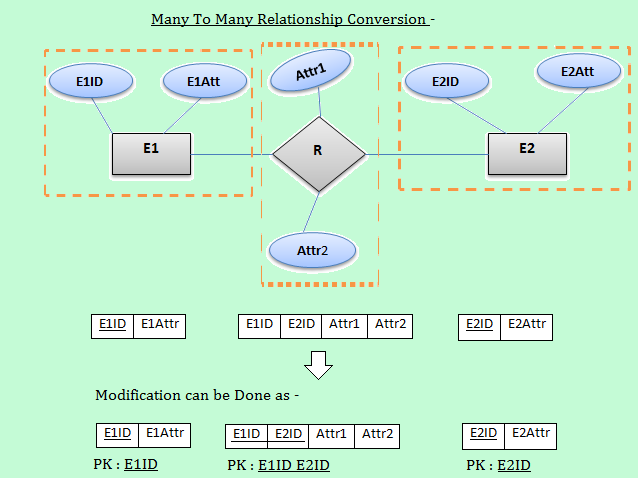
In short, The Conversion of Relationships will be done as –
6. Conversion of n-ary Relationship –
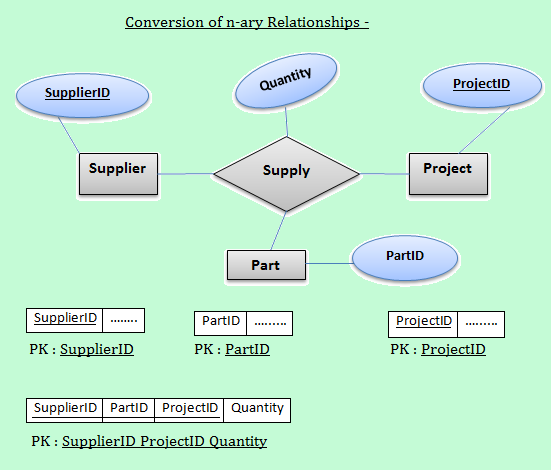
- For each n-ary relationship, Create a separate table and include primary keys of all other entities as a foreign key.
- If the relationships has some attributes, then these must also be included in the table.
7. Conversion of multivalued Attributes –
- For each multivalued attributes, create a separate table, then include all of its simple attributes.
- Include the primary key of the original table as a foreign key.